All plugins
Why How it works Providers The law Pricing FAQ Download Free
WordPress plugin - AI support chat

A chatbot that has read your documents, and says so

Upload your terms, your price list, your manuals, or import the pages you have already written. Connect Claude, ChatGPT, Gemini, Mistral or OpenRouter with your own key. It answers from what you gave it and from nothing else, and when it does not know, it hands the visitor the address of a person.

No vector database to open EU AI Act notice built in WordPress 6.0+ · PHP 7.4+
https://your-site.com/
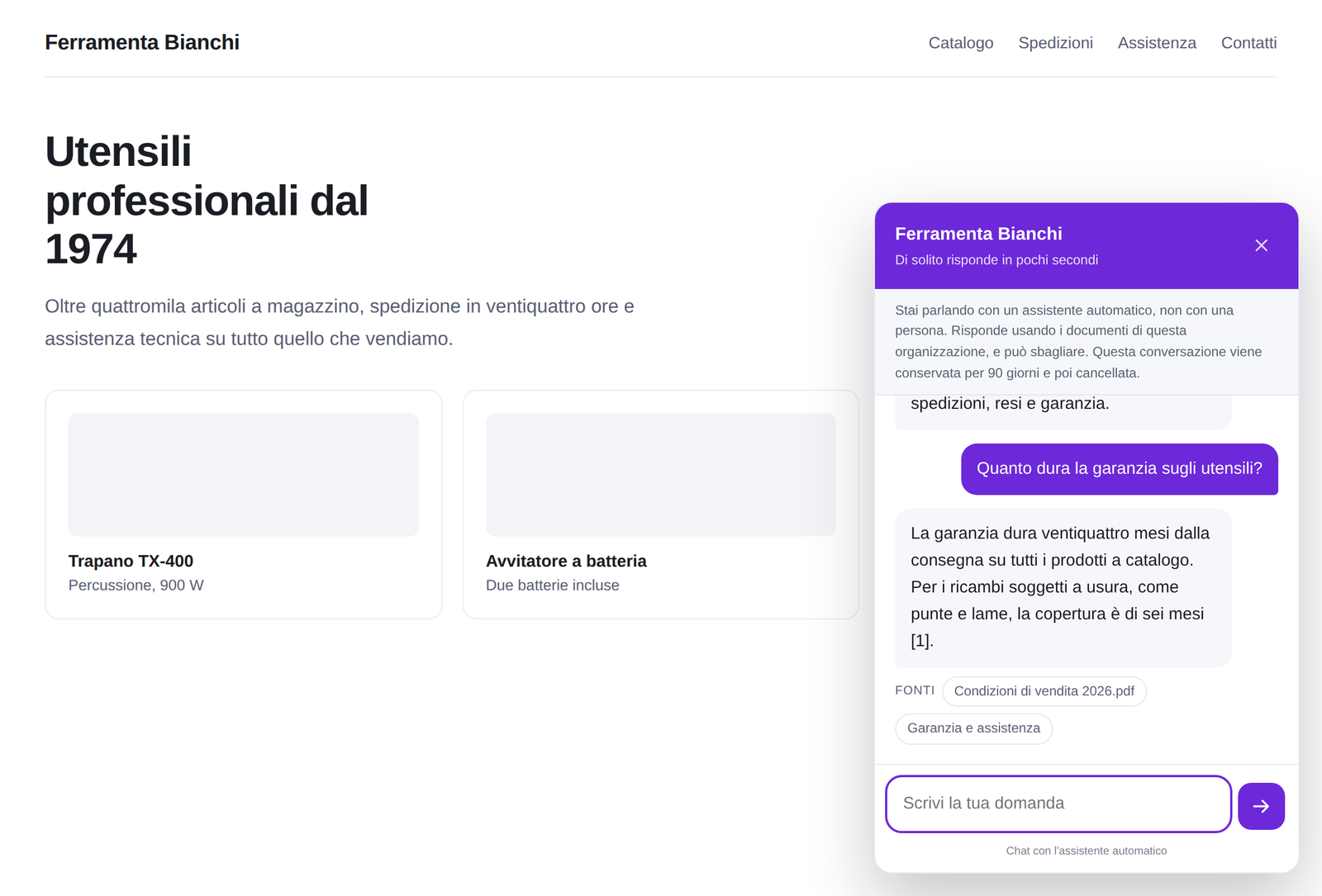
The chat window on a site, with the AI notice above the first message

The assistant on a real page. The grey line at the top is the notice the law asks for, and it cannot be switched off.

Reads what you already have

  • PDF
  • Word
  • CSV
  • Your pages
  • Plain text
Why it exists

The wall is not the AI. It is everything before it.

Putting a chatbot on a site that actually knows your business has been possible for two years. What has stopped small companies is the setup, the second service, and the quiet fear of what the thing will say in their name.

"First, open a Pinecone account"

That is where most people stop. The alternatives keep your documents in somebody else's vector database, which means a second signup, a second bill and a second thing to keep alive. Answer Desk keeps the index in your own WordPress database.
It will invent something

A chatbot that answers from general knowledge, on your site, under your name, is your company speaking. Here it answers from your documents only, shows which one each answer came from, and refuses to state a price or a date that is not written down.

And now there is a law

Since 2 August 2026, Article 50 of the EU AI Act requires that people are told they are talking to an AI, clearly, before they start. That notice is built in here and cannot be removed, only reworded.

How it works

What happens between a question and an answer

Four steps, and the only one that leaves your server is the last.

1

Your documents get split

At their real headings, so an extract still makes sense on its own. Each piece keeps the title of its section.

2

Each piece gets a fingerprint

A list of numbers that describes what it means. Built once, stored in your database, a few cents for a whole site.

3

The question is compared

Inside WordPress, against every piece, by meaning and not by word. "Can I send it back" finds the paragraph about returns.

4

The model writes the answer

From those extracts only, in the tone you chose, with the source named underneath.

Getting started elsewhere
  1. Open an account with the AI provider
  2. Open a second account with a vector database
  3. Choose a region, a metric and a dimension count
  4. Paste two keys and an index name
  5. Upload the documents

Steps two, three and four are where a company with no IT department gives up, and they have nothing to do with the chatbot.

Getting started here
  1. Open an account with the AI provider
  2. Paste one key
  3. Upload the documents

The index lives in your WordPress database and the comparison runs in PHP. That has a ceiling, in the tens of thousands of chunks, and the panel measures itself and tells you when you are near it rather than slowing down quietly. For the size of archive a company keeps in its head, it is not close.

https://your-site.com/wp-admin/
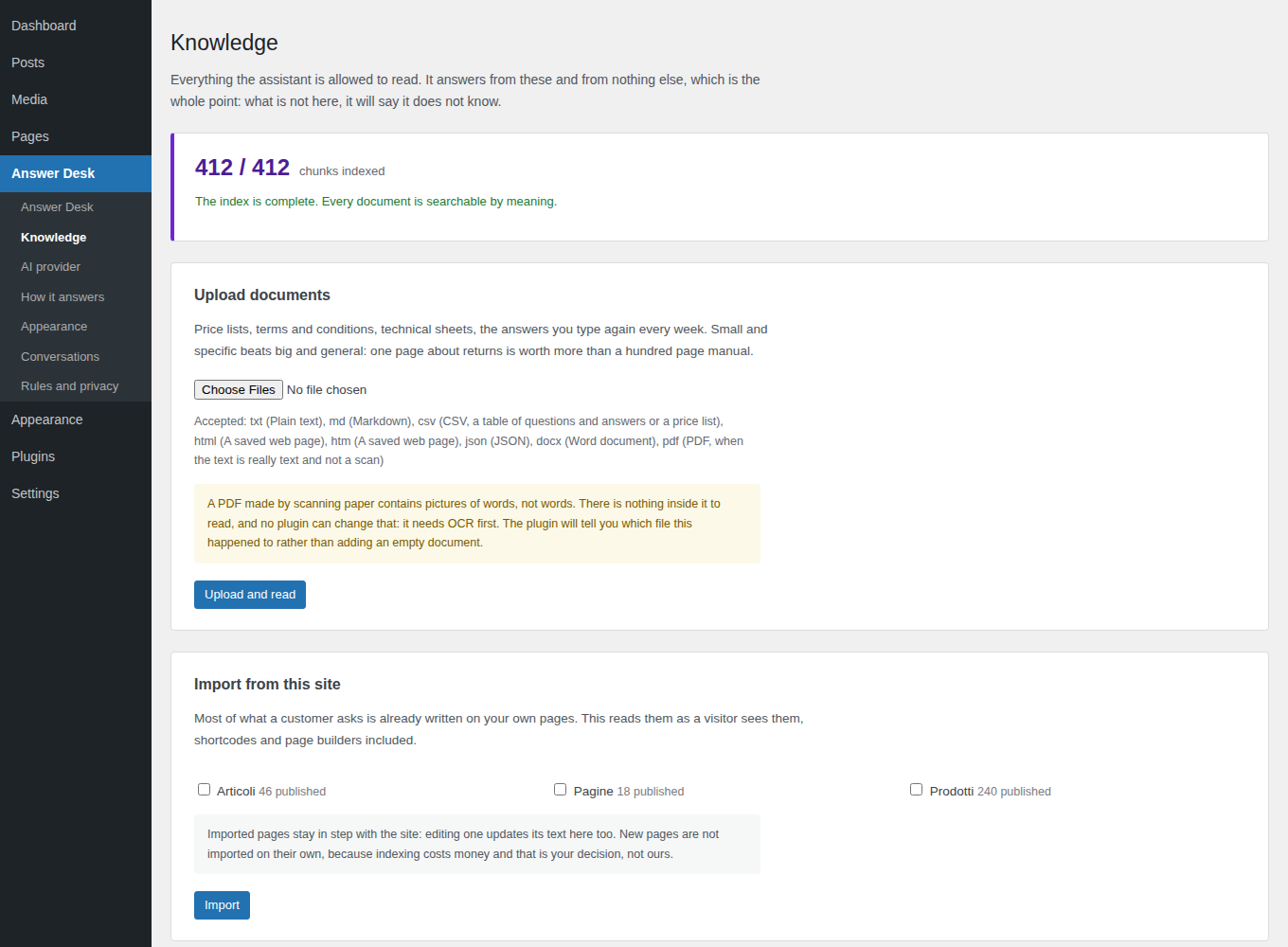
The Knowledge screen, with the documents and the state of the index

The documents screen. The third file is a scanned PDF, and the plugin says exactly why it could not read it instead of adding an empty document.

The AI

Five providers, your account, your key

You pay them directly for what you use. We never sit in the middle of that, we never see your key, and there is no per-message fee on top. The panel says, for each one, where they process and whether one key is enough.

ChatGPTOpenAI The cheapest to index with. Start here if you have no reason to prefer another. One key
ClaudeAnthropic Best at holding a tone, and at saying the documents do not cover it. Second key for the index
GeminiGoogle A free tier generous enough to see the whole thing working without a card. One key
MistralMistral AI European company, processing in the European Union. Processes in the EU
OpenRouterOpenRouter One account, hundreds of models, for comparing before you commit. Second key for the index
€0

What this plugin adds to your AI bill. Answer Desk is a licence, not a meter: the provider charges you for what you use, we charge you once a year, and nobody counts your messages in between. A support question on the smaller models costs around a tenth of a cent.

The law

What it does for you, and what stays yours

No plugin can make a site compliant, and any tool that tells you it has is selling you a comfortable story. Here is the honest split.

The AI notice, before the first message

Article 50 of the EU AI Act, in force since 2 August 2026, says a person must know they are interacting with an AI system, clearly and at the latest at the first interaction. The notice sits above the chat and cannot be switched off: it can be reworded and translated, which is a legitimate need, but not hidden, which is not.

Conversations deleted on a schedule

You set the number of days, the plugin deletes them, and deletion means the rows go. Keeping personal data longer than needed is the most common GDPR finding and the easiest to avoid.

No IP address, ever

To apply the hourly message limit the plugin keeps a one-way fingerprint of address and browser. It recognises the same person for an hour and cannot be turned back into an address, so your conversation archive never becomes a list of who visited.

Access and erasure requests

The plugin registers with the WordPress privacy tools, so somebody asking for their data, or for it to be deleted, is handled by the buttons WordPress already has instead of by hand.

Yours: the agreement and the notice

A data processing agreement with the AI provider you chose, which most of them offer in the account settings, and a paragraph in your privacy notice. WordPress helps with the second, and this plugin writes that paragraph for you, naming your provider and your retention period. Signing the first is a decision, and decisions are not something a plugin should make for you.

https://your-site.com/wp-admin/
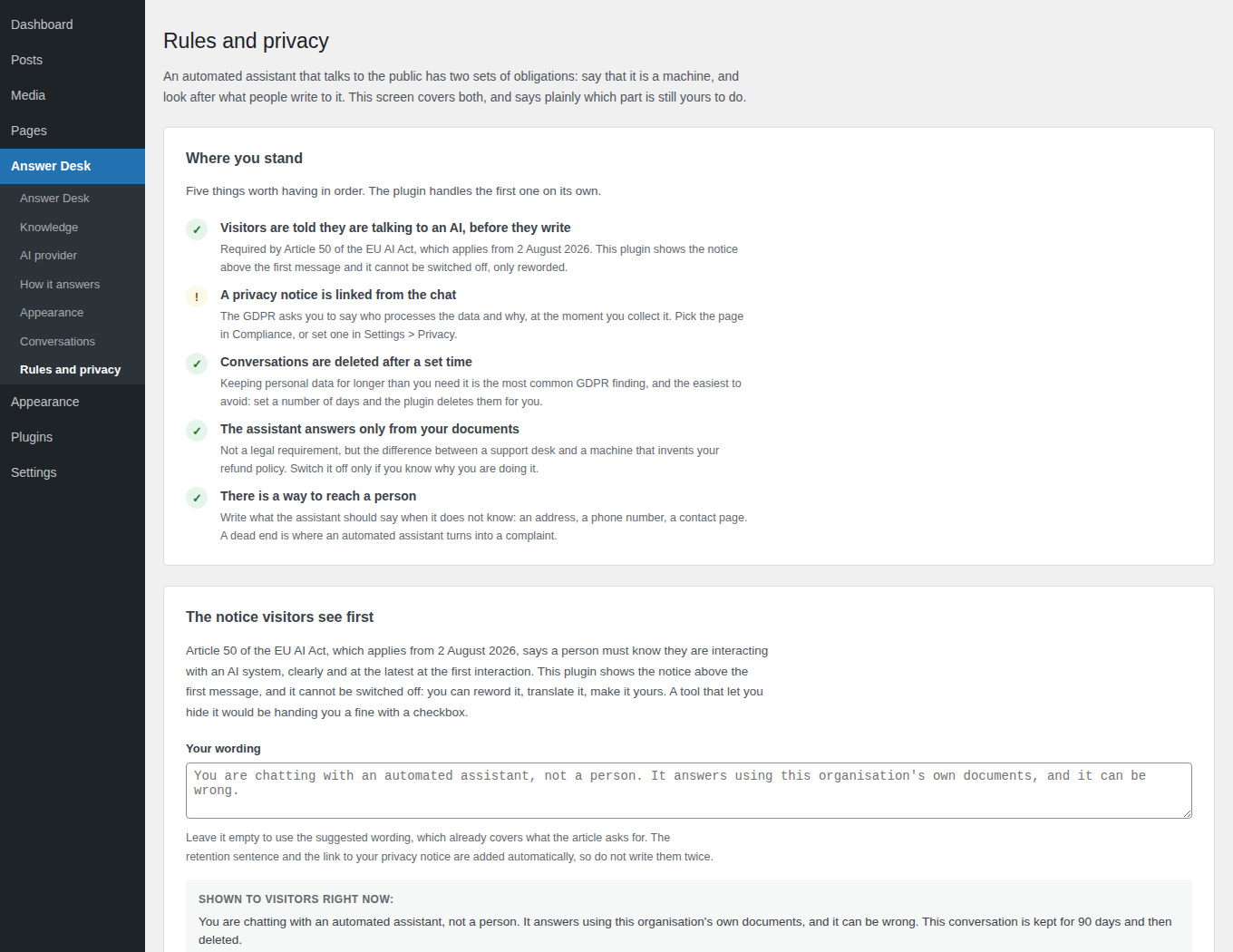
The compliance screen, listing what is in order and what is still to do

The compliance screen does not award a badge. It says what is in order, what is not, and why each line matters.

Pricing

Five documents free, and they are real documents

Not a demo with the good part greyed out. The free version runs a working assistant on a real site, with every provider, every personality and the whole compliance layer.

Pro

Every document in the answers, and the conversations kept as long as you choose.

€49,90/ year
1 site · updates included
See the plans

Or unlock everything for 7 days from inside the plugin, with no card

  • Documents without a limit
  • Conversations kept as long as you choose, exported as CSV
  • Your logo, your font, your wording on the button
  • Rules for which pages it appears on

The free version answers from the first 5 documents and keeps the last 100 conversations for 30 days. Anything beyond that stays uploaded, indexed and configured: a licence brings it back with nothing to redo and nothing paid twice for indexing.

All prices include VAT, and none of them include what your AI provider charges you. Studio and Agency plans on the pricing page. 14-day refund, no questions asked.

FAQ

The questions people actually ask

Whatever your AI provider charges, and nothing from us beyond the yearly licence. On the smaller models a support question with five extracts costs about a tenth of a cent; indexing a whole site is usually a few cents, once. The plugin shows an estimate before you index, counts the answers given today, and lets you set a daily ceiling, so the surprise invoice that people worry about is something you can simply switch off.

No, and that is the main difference between this and the alternatives. The index sits in your WordPress database and the comparison runs in PHP. That approach has a ceiling: on an archive of tens of thousands of chunks the search gets slower, and the plugin measures its own search time and says so on screen rather than timing out quietly. If you are running a documentation site of that size, tell us before you buy and we will say honestly whether this is the right tool for it.

It can be wrong, and the notice tells visitors so. What it will not do, with the default setting, is answer from outside your documents: when they do not cover a question it says so and gives the way to reach a person. Prices, dates, phone numbers and legal statements that are not in your documents are refused explicitly, because those are the inventions that cost money. Every conversation is stored, so when somebody quotes an answer back at you, you can read exactly what was said and which document it came from.

PDFs produced by a writing program, yes. PDFs made by scanning paper, no: inside them there are pictures of words, not words, and no plugin can read those without OCR. The difference matters and the plugin tells you which file it happened to, with what to do about it, instead of adding an empty document and leaving you to wonder why the assistant has never heard of your price list.

If you have no particular reason, ChatGPT: cheapest to index and one key covers everything. If "where is the data processed" has to have a European answer, Mistral. If you want the best instruction following and do not mind a second key for the index, Claude paired with Voyage AI, which is the pairing Anthropic recommends itself. You can change your mind later without reuploading anything.

Article 50 of the EU AI Act has applied since 2 August 2026 and requires that a person interacting with an AI system is told so, clearly and at the latest at the first interaction. It is an obligation on whoever puts the system in front of people. You can reword the notice, translate it and make it sound like you; you cannot remove it from this plugin, and a tool that let you would be handing you a fine with a checkbox.

It answers from the first 5 documents, keeps the last 100 conversations for up to 30 days and does not export them. Every provider, every personality, the whole compliance layer and the whole interface are there. Documents beyond the fifth stay uploaded and indexed and simply wait, so activating a licence costs you no re-indexing and no reconfiguring.

Give it five documents and ask it something hard

The free version is not a demo. Install it, upload the five files you answer questions from every week, and see what it does with them.

7-day full trial inside the plugin, no card required · 14-day refund