Three words are not an explanation
"Disable REST API" tells you nothing about the contact form that stops working, or the shop pages that go blank. You find out from a customer, on a Friday. Here that sentence is on the card, before the switch.
The things you install a separate plugin for: a cleaner dashboard, a login address that is not the usual one, comments closed for good, your tracking code in the head, uploads resized. Each one is a switch, and each switch tells you what it does, what it changes and what is worth knowing before you press it.
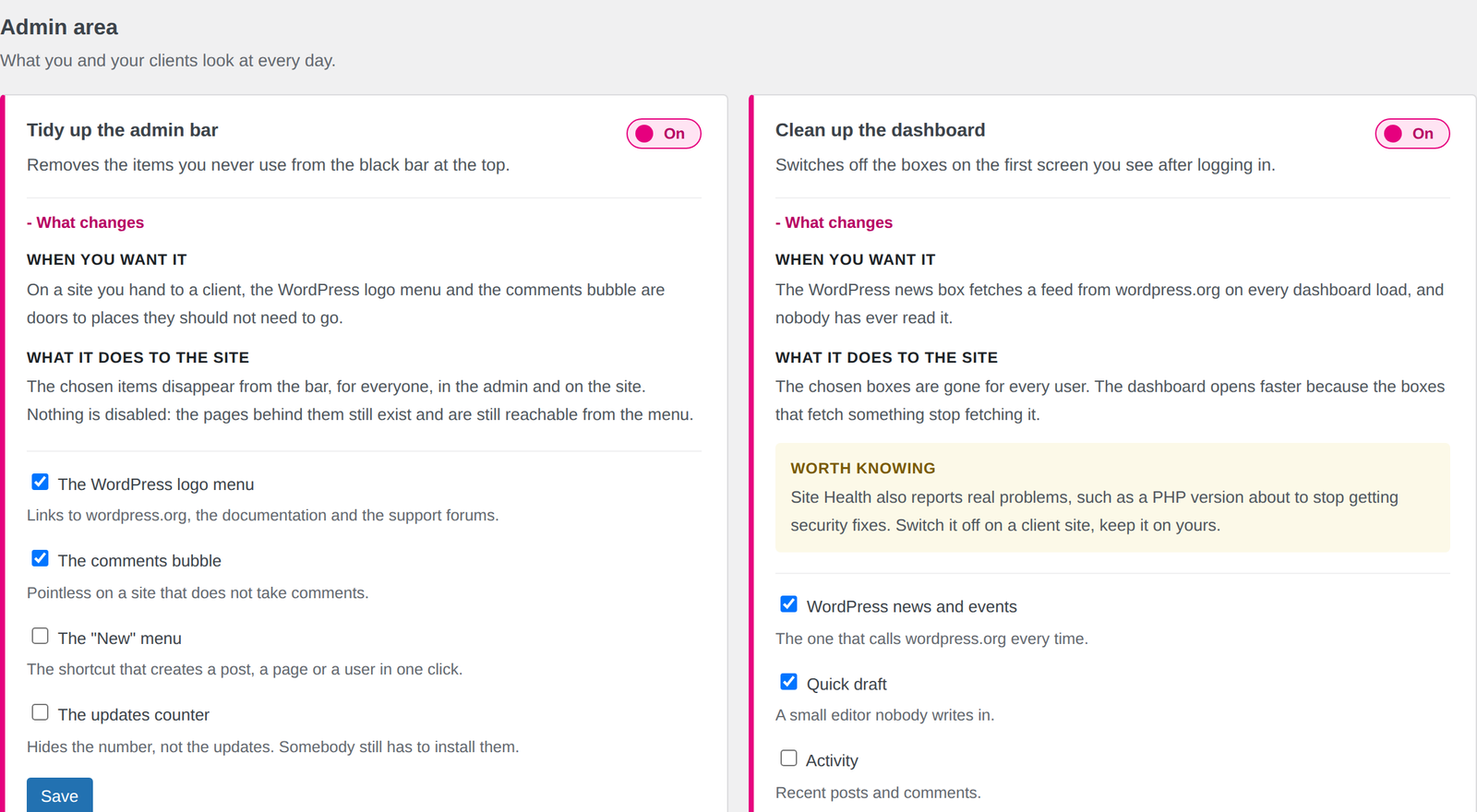
The panel, exactly as it ships. That text under each switch is the whole point.
Replaces the handful you install on every site
Plugins like this one have existed for years, some with a hundred options. What none of them has is a straight answer to the only question that matters at the moment you press: what is this going to do to my site?
"Disable REST API" tells you nothing about the contact form that stops working, or the shop pages that go blank. You find out from a customer, on a Friday. Here that sentence is on the card, before the switch.
Twenty-eight modules, and the ones you did not switch on are never loaded: the file is not read, the class is not built, no hook is registered. The panel shows the running count, so the weight is a number you can check.
One for the comments, one for the login, one for the tracking code, one for duplicating a page. Each with its own settings screen, its own updates and its own week where it breaks. This is one plugin and one screen.
Not a feature list written to look long. These are the things we switch on, site after site, before handing a WordPress install to anybody.
What you and your clients look at every day.
The front door of the site, and who comes through it.
Small gaps in how WordPress handles posts and media.
Parts of WordPress most sites never use, and still pay for.
CSS, tracking tags and the two files people always need to edit.
What the database and the browser carry without being asked.
Things you need twice a year and never remember how to do.
Showcase site, site handed to a client, site with an editorial team.
Modules running on a typical client site, out of twenty-eight. The other twenty-one are never loaded, so they cost that site exactly nothing. The panel shows this number at the top, on purpose.
This is the whole argument for this plugin. On the left, how a switch like this normally arrives. On the right, how it arrives here.
So you tick it, because it sounds like a good idea, and three weeks later the contact form stops sending. Nothing told you it would.
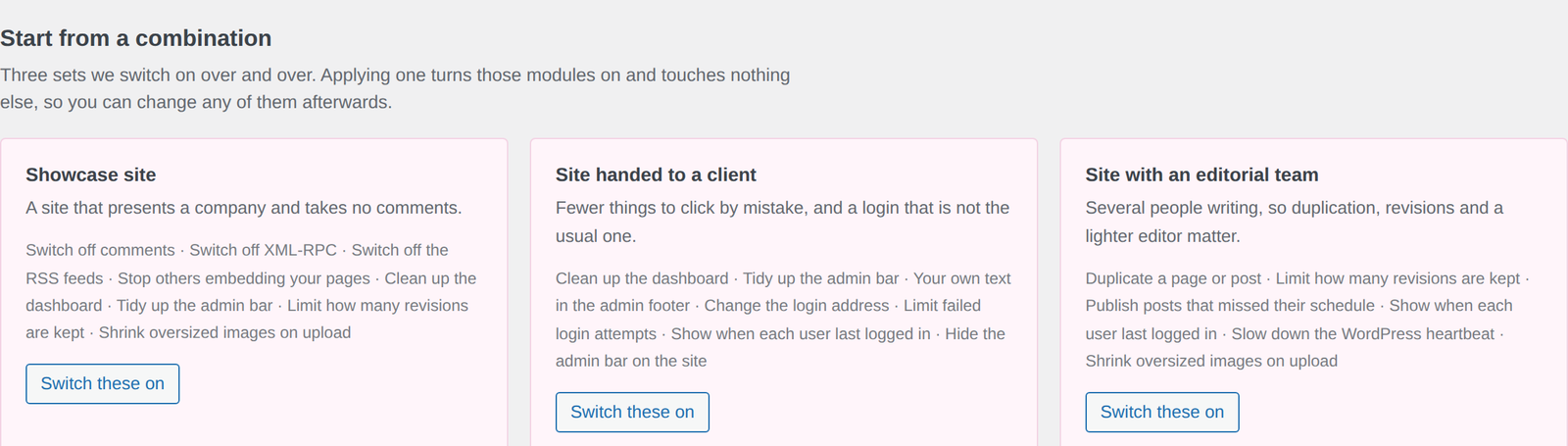
Three combinations to start from. Applying one switches those modules on and leaves everything else alone.
The plugin arrives with everything off. Activating it adds one menu entry and changes nothing else on the site.
Upload the zip from Plugins, Add new. WP Plus+ appears in the menu, with every module off.
Or skip it and switch on the four or five modules you know you want.
Open "What changes" on anything you are not sure about. That is what it is there for.
Open the home page and a form in a private window. Switch a module off and everything is as it was.
Not a trial version with the good parts greyed out. All twenty-eight are there and all of them can be configured: the free version runs the first five you switched on.
Every module running at the same time, with no limit on how many.
Or unlock everything for 7 days from inside the plugin, with no card
The free version runs the first 5 modules you switched on. A module over that limit stays switched on, keeps every option you gave it, and says so on its own card: activating a licence starts it immediately, with nothing to reconfigure.
All prices include VAT. Studio and Agency plans on the pricing page. 14-day refund, no questions asked.
It is as heavy as the modules you switched on. A module that is off is not loaded at all: its file is never read from disk, its class is never built, it registers no hook and runs no query. That is why the panel shows the running count at the top, and why it is usually five or six.
No. Every module arrives off. Activating the plugin adds one entry to the menu and does nothing else, so you can install it on a live site at three in the afternoon and look around first.
Switch the module off and the site is exactly as it was. Modules add behaviour while they run; none of them rewrites your content or deletes anything. The two that need a second look before you press, closing the REST API and moving the login address, say so on the card in the part marked "worth knowing".
No. Options are stored per module and stay there. Switch it back on and you find them as you left them. The same is true of the free limit: a module over the fifth keeps every option it had, it simply does not run.
Usually most of them. Switch on the matching module, check the page it affects, then deactivate the old plugin, one at a time rather than all in one afternoon. Where a plugin does much more than one job, a page builder or a full security suite for instance, keep it: this is not trying to be either.
Nothing is hidden and nothing is greyed out: all twenty-eight modules are in the package and all of them can be configured. The free version runs the first five you switched on, and the panel says plainly which ones are switched on but idle. A licence starts the rest, with nothing to set up again.
WordPress 6.0 or later and PHP 7.4 or later. No external service, no API key, no account with us beyond the licence itself. The interface is in English and follows the language set in WordPress; Italian ships with it.
Open any module, press "What changes", and decide whether that is how a setting should be written.
7-day full trial inside the plugin, no card required · 14-day refund