To block Google Analytics until consent on WordPress, the Google tag must not run when the page loads. It runs only after the visitor clicks Accept, or accepts the Statistics category. You can do it by hand in the theme, inside Google Tag Manager, or with a consent plugin that holds the tag back for you. In all three cases, Google Consent Mode v2 tells Google what the visitor chose.
The trouble is that most sites think they already do this. The banner is there, but the Analytics snippet sits in the header and fires on the first page view. This guide shows how to check, then how to fix it.
Check whether Analytics loads before consent
- Open your site in a private window.
- Open the developer tools (F12), choose the Network tab and reload.
- Without touching the banner, type
collectin the filter. A request togoogle-analytics.com/g/collectorregion1.google-analytics.commeans a page view has already been sent. - Now type
gtagorgtm. Ifgoogletagmanager.com/gtag/jsorgtm.jsappears, the Google tag is loaded. - In Application > Cookies, look for
_gaand_ga_XXXX.
If you see any of these before clicking, Analytics runs without consent. On WordPress the snippet usually comes from Site Kit by Google, a theme option, a header and footer plugin, or a line pasted into header.php. Find where yours comes from before you change anything, so you do not end up with two tags.
What Consent Mode v2 does, and what it does not
Consent Mode is Google's way for your site to tell its tags what the visitor chose. You set a default state when the page loads, usually everything denied, and update it after the visitor answers. Google's consent mode guide lists the four signals that matter:
analytics_storage: Analytics cookies.ad_storage: advertising cookies.ad_user_data: sending user data to Google for advertising.ad_personalization: personalised ads and remarketing.
The last two are the "v2" part. Google has required them since March 2024 for traffic from the European Economic Area: without them, Google Ads loses audiences and remarketing for those visitors.
Consent Mode has two ways of working, and the difference matters for the GDPR:
- Basic: the Google tag does not load at all until the visitor accepts. Nothing reaches Google before consent.
- Advanced: the tag loads straight away with everything denied and sends "cookieless pings" that Google uses to model the missing data.
Advanced mode still sends requests to Google, with the visitor's IP address, before any choice. Several European authorities consider that a transfer needing consent too. If you want the safe side, use the basic way: block the tag, and send the Consent Mode signals when it is allowed to load.
Three ways to block Analytics on WordPress
1. By hand, in the theme
Print the Consent Mode defaults first, as high as possible in the <head>, then load gtag.js only after your banner reports a yes:
<script>
window.dataLayer = window.dataLayer || [];
function gtag(){dataLayer.push(arguments);}
gtag('consent', 'default', {
  analytics_storage: 'denied',
  ad_storage: 'denied',
  ad_user_data: 'denied',
  ad_personalization: 'denied',
  wait_for_update: 500
});
</script>
When the visitor accepts, call gtag('consent', 'update', {analytics_storage: 'granted'}) and inject the gtag.js script. This works, but you write and maintain the banner, the cookie and the log yourself, and every new tracker means new code.
2. Inside Google Tag Manager
If all your tags live in a GTM container, you can set Consent Mode defaults there and add a consent condition to each tag. Two warnings. The container itself, gtm.js, still loads before consent, so it still contacts Google. And GTM only controls what is inside it: a pixel added by a plugin or a YouTube video in a page are outside its reach.
3. With a consent plugin that blocks
A plugin can find the Google tag in the page and switch it off until the visitor accepts, whatever put it there. This is the only one of the three ways that also covers the Meta Pixel, embedded videos, maps and the services you forgot about. Check that the plugin blocks before consent instead of only "informing": the private window test above tells you in a minute.
How Cookie Consent does it
Cookie Consent takes the third way. Before the page leaves your server, it finds the Google tag (and about fifty other services) and turns it off. When the visitor accepts Statistics, it turns the tag back on in the browser, without reloading the page.
- Consent Mode v2 defaults are printed at the very top of the page, before any Google tag, with every signal denied and a short
wait_for_updateso returning visitors who already accepted are counted correctly. - Statistics grants
analytics_storage; Marketing grantsad_storage,ad_user_dataandad_personalization. - Tag Manager is blocked until consent by default. If you already manage consent inside your container, you can let it load and rely on the signals.
- Global Privacy Control: visitors whose browser sends this signal are treated as a refusal of marketing.
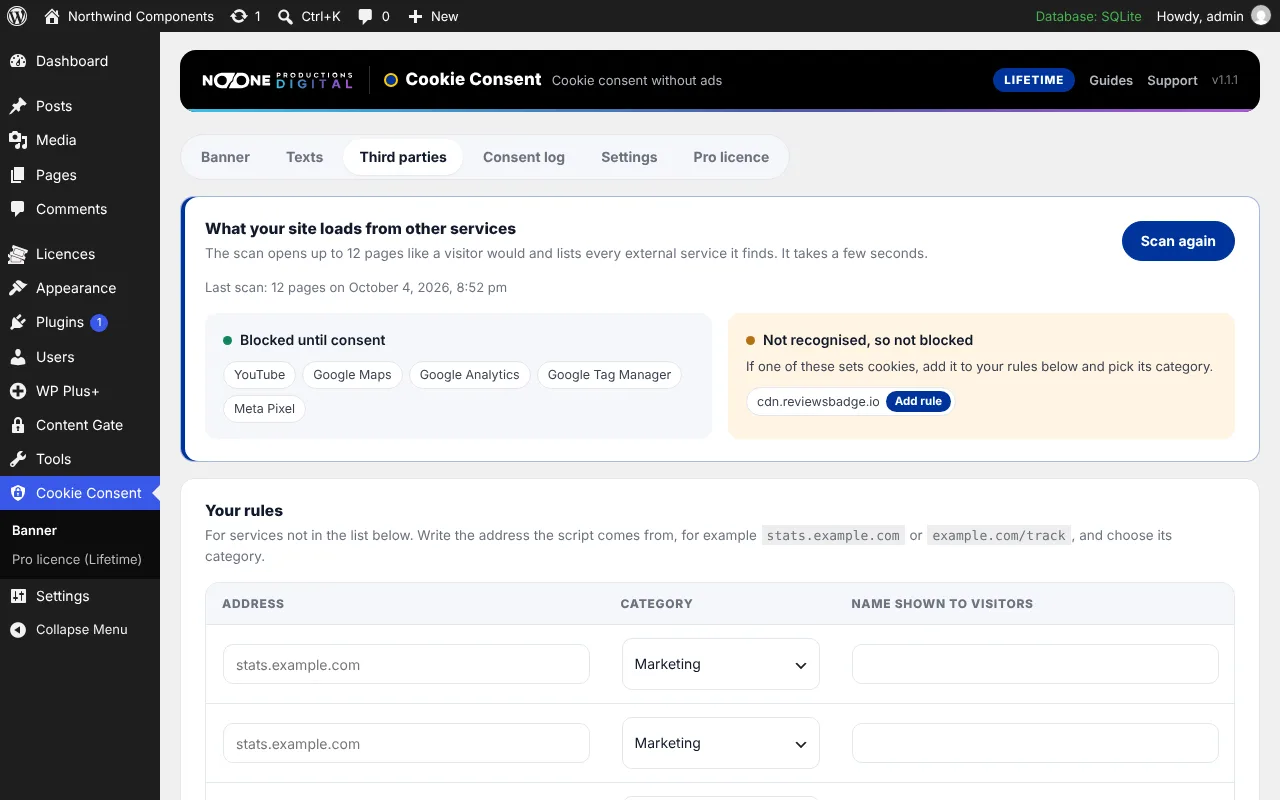
All of this is in the free version. The guide Settings explains the Google options, and Third parties and scan shows how to catch the trackers you did not know about.
After the fix: what changes in your numbers
Expect fewer visits in Google Analytics. Every visitor who rejects, or who leaves without answering, is no longer counted. The drop varies a lot by audience and by how the banner looks, so compare trends over time instead of the raw numbers before and after. Your server logs and your sales stay the real reference.
If the numbers do not drop at all, test again in a private window: something may still load before consent.
Frequently asked questions
Is Consent Mode v2 enough to be GDPR compliant?
No. Consent Mode only passes the visitor's choice to Google tags. You still need a banner that asks, a record of consent, and, to be on the safe side, tags that do not load at all before a yes.
What is the difference between basic and advanced Consent Mode?
In basic mode the Google tag does not load until the visitor accepts. In advanced mode it loads straight away with consent denied and sends cookieless pings to Google, which still include the visitor's IP address.
Does blocking Analytics break Google Ads conversions?
Conversions from visitors who accept marketing are tracked as before. For those who refuse, Google uses modelling when Consent Mode v2 signals are present. Without the v2 signals, Google Ads loses audiences and remarketing for EEA visitors.
Why did my Analytics traffic drop after installing a cookie banner?
Because visitors who reject or ignore the banner are no longer counted. The drop shows the banner works. Compare trends over weeks instead of comparing raw numbers before and after.