In the Google Drive API, OAuth lets a website act as a person: someone signs in with Google, approves access, and the site borrows that person's permission. A service account is a separate Google identity that belongs to the website and sees only the folders you share with it. OAuth connections set up with your own Google app can expire after 7 days or need Google's verification; a service account avoids both, but gives you a key file to keep safe.
Two ways a website can get into Google Drive
A WordPress plugin that shows Drive files has to prove to Google that it is allowed to read them. Google offers two main ways to do that, and the difference is easiest to see with an everyday comparison.
OAuth: lending your own access
Think of a hotel guest who signs a form so the concierge can collect parcels on their behalf. With OAuth, you click Sign in with Google, Google shows a screen that says which app is asking and what it wants to see, and you click Allow. Google then gives the website a long-lasting pass (called a refresh token) so it can come back without asking you again. The website sees what your account sees, within the limits of what it asked for.
Service account: a new colleague with their own badge
Now think of hiring an assistant with their own staff badge. They start with access to nothing. You share one folder with them, the same way you share a folder with a colleague, and that is all they can open. A service account works like that: it is a Google identity for software, with its own email address (ending in iam.gserviceaccount.com). Google's own guide says you can treat the service account's email address as a user account in the share settings. Nobody signs in and there is no approval screen.
Why Google Drive connections on websites expire
If you have ever seen a Drive plugin ask you to "reconnect" every week, or show an error such as invalid_grant, the cause is usually the OAuth pass, not the plugin.
Many plugins ask you to create your own Google app: a project in Google Cloud with a consent screen, a client ID, a redirect address and a list of test users. A new app starts in the Testing publishing status. Google's documentation is clear that refresh tokens from an app in Testing expire in 7 days, unless the app asks only for basic profile information. Reading Drive is not basic profile information, so the pass stops working a week after you connect.
Moving the app out of Testing (the Publish app button on the Audience page of Google's console) removes the 7-day limit, but brings in the next topic: verification. Even a published app's pass can also stop for other reasons that Google lists:
- the person revokes the app's access in their Google account;
- the pass has not been used for six months;
- the account has reached Google's limit of live passes;
- a Google Workspace administrator restricts the app for the organisation.
There is also a human point. An OAuth connection is tied to one person's account. If the colleague who clicked Allow leaves and their account is closed, the website loses access with them.
Why Google asks for verification
When an app asks for access, it names one or more scopes: the size of the access it wants. Google sorts scopes into non-sensitive, sensitive and restricted. For Drive, the scopes that read everything in someone's Drive, including the read-only one, are classed as restricted.
A published app that uses restricted scopes and serves the public has to pass Google's restricted scope verification. If the data passes through a server, as it does with a website, Google also requires a security assessment by an independent assessor, repeated at least every 12 months. Google warns the process can take several weeks.
Until an app is verified, people who sign in see a warning that Google has not verified it, and the app is capped at 100 users. Google does allow an unverified app for personal use by fewer than 100 people, so a site owner can click through the warning for their own app. It works, but it is not something to hand over to a client.
That is why Drive plugins usually take one of three routes:
- The plugin maker's own verified app. You click Sign in with Google and approve the maker's app. No Google Cloud work for you, but you grant that app access to your Drive through your own account.
- Your own OAuth app. You create the app yourself in Google Cloud. Left in Testing it expires weekly; published it shows the unverified warning.
- A service account. No sign-in and no consent screen, so none of the above applies.
There is also a narrow scope, often called "drive.file", which Google classes as non-sensitive. It only covers the specific files a person opens or creates with that app, so it suits tools that save or pick single files, not a page that must show whatever you add to a folder.
What a service account changes
With a service account, the website has its own identity, and you decide what it sees by sharing. That changes several things at once.
- No weekly expiry. The connection uses a key file, not a sign-in. Google states that service account keys never expire by default. The key stops working if you delete it in Google Cloud, or if your organisation has set a key lifetime.
- No consent screen, no test users, no app to publish. Nobody approves anything, so there is nothing for Google to show a warning about.
- Access you can see. The service account sees only the folders shared with it. Open the folder's Share window in Drive and its address is listed like any person. Remove it and access ends at once.
- Not tied to one person. Staff can come and go; the website keeps its own identity.
It is not free of trade-offs. The key file is a password: anyone who has it can read what the service account can read, so it should never be emailed or left in a public folder. Setting it up means about ten minutes in the Google Cloud console. And in Google Workspace, two organisation settings can get in the way: Google Cloud organisations created since 3 May 2024 block key creation by default, and some organisations forbid sharing with addresses outside the domain. In both cases an administrator can make an exception.
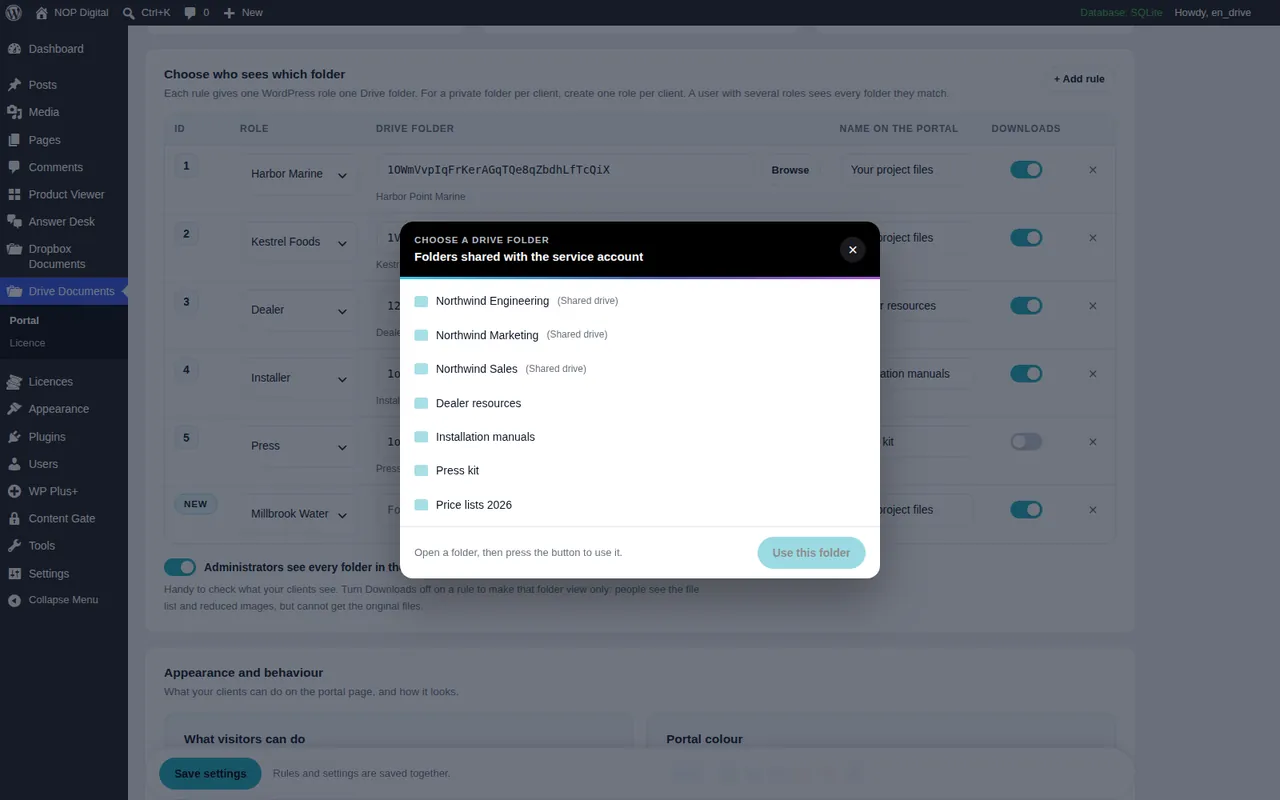
Shared drives work too. You either add the service account's address as a member of the shared drive, or share a single folder inside it.
Service account vs OAuth for Google Drive: side by side
| Plugin maker's verified app | Your own OAuth app | Service account | |
|---|---|---|---|
| Who signs in | You, with your Google account | You, with your Google account | Nobody |
| Can stop by itself | Revoked, unused 6 months, admin policy | After 7 days in Testing, plus the same reasons | No, only if the key is deleted or the folder unshared |
| Google warning screen | No | Yes, until Google verifies it | No screen at all |
| What it can see | What the app asked for in your Drive | What the app asked for in your Drive | Only folders shared with it |
| Your setup work | A click | Consent screen, client ID, redirect address, test users | A project, a key file, one share |
| Best for | Quick connections where you trust the vendor | Developers testing their own tools | Websites that show your files to your users |
Which one should your website use
OAuth is the right tool when each visitor must reach their own Drive: for example a form where people pick a file from their Google account. Only the person can give that permission, so a service account cannot replace it.
A service account is the better fit when the website shows your files to your users: a client area, a dealer area, a staff document page. Here the website needs one stable connection to a few folders, and who sees what is decided by your website's logins, not by Google.
This is the choice we made for Google Drive Portal. It connects only with a service account, so there is no redirect address to copy, no consent screen, no test users and no app to publish or verify. The connection guide walks through the project, the key and the share, and the connection problems page explains each message in plain words. To see where this fits in a real setup, read how to build a Google Drive client portal.
In short
OAuth borrows a person's access. With your own Google app it expires every 7 days while in Testing, and once published it shows a warning until Google verifies it, a process that for full Drive access includes a yearly security assessment. A plugin maker's verified app avoids that, but the connection still belongs to one person's account.
A service account gives the website its own identity that sees only what you share, does not expire by default and needs no verification screen. You pay for that with a key file to guard and a short setup in Google Cloud. For a site that shows your Drive folders to your clients or staff, it is usually the calmer choice. If you only need to show a public folder, you may not need either: see how to embed a Google Drive folder in WordPress.
Frequently asked questions
Why does my Google Drive plugin disconnect every 7 days?
The plugin most likely uses a Google app you created that is still in the Testing publishing status. Google makes the access passes of apps in Testing expire after 7 days, so you have to reconnect each week.
Does a service account key expire?
Not by default. It keeps working until you delete it in Google Cloud, unless your organisation has set a maximum key lifetime.
Does a service account need Google app verification?
Google's app verification applies to the screen where people sign in and approve an app. A service account has no sign-in and no approval screen: you give it access by sharing folders with its address.
Can a service account see my whole Google Drive?
No. It starts with access to nothing and sees only the files, folders and shared drives you share with its email address. Unshare a folder and it loses access.