A hidden page is not a quiet page
Blocking the page leaves the title in archives, in the site search and in the feed, and leaves the full content readable at /wp-json. Content Gate treats those as part of the same rule, not as an afterthought.
Restrict pages, posts, blocks and widgets by login status, user role or device. Choose the outcome yourself: a message where the content was, a redirect, or another page. Every option says in plain words what it does, before you press save.
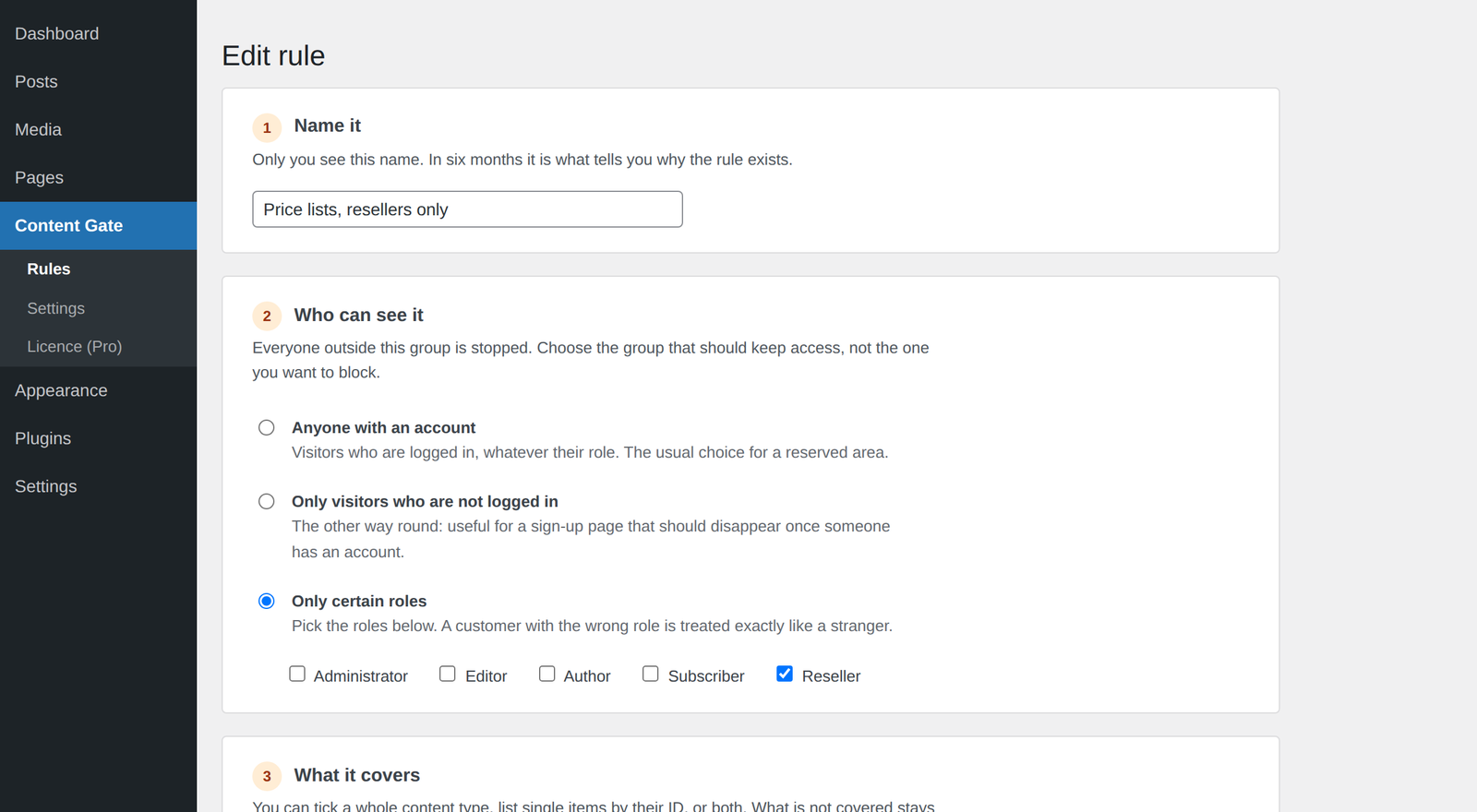
The rule screen, exactly as it ships. Every option says what it changes.
Works with the stack you already run
Most restriction plugins ask you to tick a box and trust them. Then the title turns up in a category list, the whole text comes back in the REST API, and nobody finds out until a customer does.
Blocking the page leaves the title in archives, in the site search and in the feed, and leaves the full content readable at /wp-json. Content Gate treats those as part of the same rule, not as an afterthought.
A restriction panel is usually a wall of checkboxes with three words each. You are closing content to your own visitors: you should know what a box does before you tick it, not after someone complains.
One rule that covers everything, written while tired, and the admin cannot get back in. Here administrators keep access by default, and the setting that changes it says exactly what it will do.
Who keeps access, what the rule covers, what everyone else gets, and how far the rule reaches. Answer those four and the rule is done.
Nothing is added, nothing is rewritten, nothing loads that would not have loaded anyway. A rule that lets someone through costs them nothing.
Your message where the content was, a redirect to the login page and back again, or a whole page of your own with a form on it.
[content_gate] for a paragraph inside an otherwise public page.Not a tooltip, not a link to a knowledge base: the sentence that tells you what the option does, and what it will cost you, sits under the option.
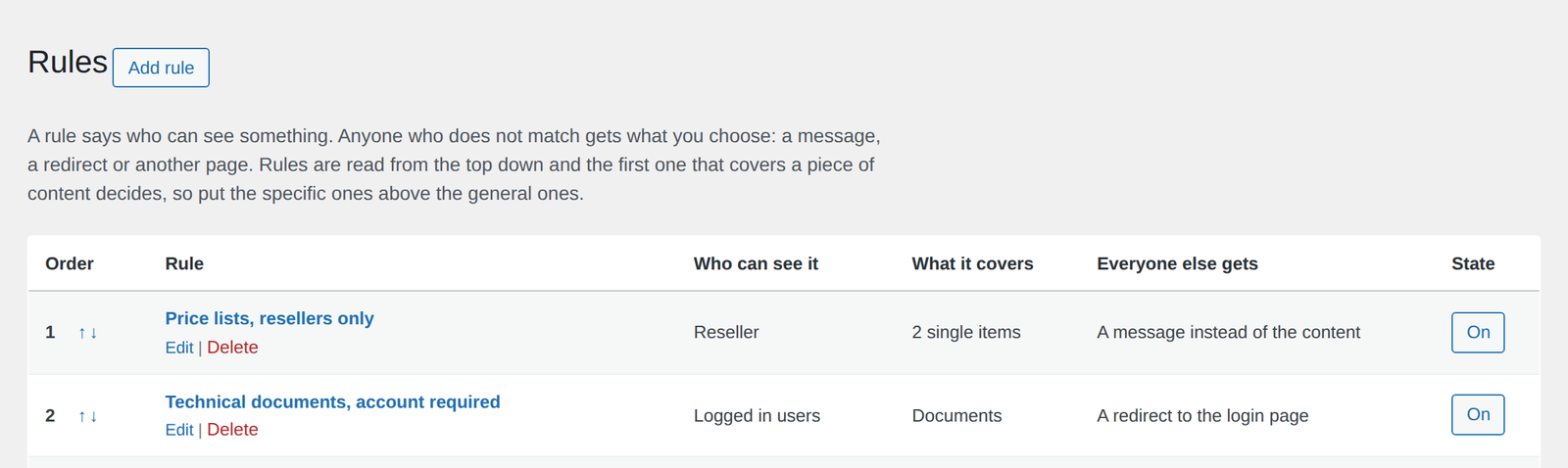
The list says, for each rule, who keeps access and what a blocked visitor receives.
No service to connect, no key to paste, nothing to configure before the first rule.
Upload the zip from Plugins, Add new. Content Gate appears in the menu, empty.
Six steps, each one explained: who keeps access, what it covers, what everyone else gets.
Open the page in a private window. That is the visitor's view, and it is the only test that counts.
More specific rules go above the general ones, and the arrows in the list move them.
The free version applies two rules with conditions by login status. That is a working reserved area, not a demo.
Rules without a limit, roles, blocks, widgets and the rest.
Or unlock everything for 7 days from inside the plugin, with no card
The free version applies the first 2 rules, by login status. Whatever you configure beyond that stays saved and starts working the moment a licence is active: a limit that emptied a rule would republish what you meant to close.
All prices include VAT. Studio and Agency plans on the pricing page. 14-day refund, no questions asked.
No. Administrators keep seeing everything, and that stays on unless you switch it off yourself in Settings. Switching it off for a minute is in fact the right way to check what a visitor really sees, and the setting says so.
No, and no plugin can from inside WordPress. A PDF you upload keeps its own direct address, and closing that is the web server's job. Content Gate restricts the pages, and says this plainly in the settings instead of letting you assume otherwise. If the files themselves must be private, they belong behind a portal that streams them through WordPress: that is what our Dropbox and Google Drive plugins do.
The first rule from the top decides, whichever way it decides. That is deliberate: it means a specific rule placed above a general one opens a real exception instead of being overruled from below. The arrows in the list move a rule up or down.
Rules by login status and by role do: a cache serves logged out visitors and leaves logged in ones alone. Rules by device are the exception, because a cache can hand the wrong version to the wrong screen, and the option says so where you tick it. For layout choices there is per-block hiding by screen size, which runs in CSS and survives any cache.
Not on its own: Content Gate decides who sees what, it does not take payments. It works next to whatever handles the accounts, because it reads the WordPress role. If a membership or shop plugin gives a customer a role, a rule for that role covers them.
It applies the first 2 rules, with conditions by login status. Roles, devices, per-block and per-widget visibility, hiding from archives, search and the REST API, replacement pages and targeting by term are Pro.
The limits apply to what is applied, never to what is stored. A rule over the limit keeps every condition you gave it and comes back the moment a licence is active. In a plugin like this the opposite would be dangerous: an emptied rule does not fail loudly, it quietly republishes something you meant to close.
WordPress 6.0 or later and PHP 7.4 or later. No external service, no API key, no account with us beyond the licence itself. Every decision is taken on your own server.
Install the free version, write one rule and open the page in a private window. That is the whole test.
7-day full trial inside the plugin, no card required · 14-day refund